Capture One Review 2026: Is It Better Than Adobe Lightroom?
 shotinspect
Introduction
Capture One is one of the most powerful professional photo editing software tools available in 2026. It is widely used by studio photographers, fashion photographers, and commercial creatives who require extremely accurate color control and tethered shooting capabilities.
However, Adobe Lightroom remains the industry standard for most photographers. This leads to a common question:
👉 Is Capture One actually better than Lightroom in 2026?
This review breaks down real-world performance, strengths, weaknesses, and who should choose Capture One over Adobe Lightroom.
What Is Capture One?
Capture One is a professional RAW image processing software developed by Phase One. It is designed for high-end photography workflows, especially in studio environments.
Unlike Lightroom, Capture One focuses heavily on:
- Color precision
- Tethered shooting
- Layer-based editing
- Advanced RAW control
Capture One vs Lightroom: Core Difference
Adobe Lightroom
- Designed for workflow efficiency
- Best for organizing + editing large photo libraries
- Strong ecosystem integration (Photoshop + Cloud)
Capture One
- Designed for maximum image quality control
- Best for studio and commercial photography
- Superior color science and tethering tools
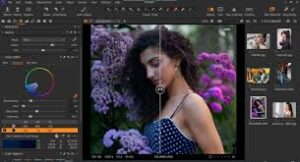
Image Quality Comparison
Capture One Strengths:
- Extremely accurate color rendering
- Better control over skin tones
- More precise RAW processing engine
- Cleaner highlight recovery in some cases
Lightroom Strengths:
- Excellent overall image quality
- More consistent workflow output
- Strong AI-powered editing tools
👉 Result: Capture One wins in color precision, Lightroom wins in workflow consistency
Color Editing System
This is where Capture One stands out.
Features:
- Advanced color wheel system
- Layer-based color adjustments
- Highly precise color grading control
Lightroom Comparison:
- Easier to use
- Faster workflow
- Less granular control
👉 Capture One is preferred by commercial and fashion photographers for this reason.

Workflow & Usability
Lightroom:
- Fast import and export
- Easy batch editing
- Beginner-friendly interface
- Cloud synchronization
Capture One:
- More complex interface
- Steeper learning curve
- Slower initial workflow setup
- Extremely powerful once mastered
Tethered Shooting (Major Advantage for Capture One)
Capture One is widely considered the best tool for tethered shooting.
Advantages:
- Instant camera-to-software connection
- Real-time image preview on large screens
- Ideal for studio sessions
- Widely used in fashion photography
👉 Lightroom supports tethering, but Capture One is significantly more stable and professional in this area.
Performance in 2026
Capture One:
- Stable performance for high-end RAW files
- Optimized for studio workflows
- Slightly heavier system requirements
Lightroom:
- Faster batch processing
- Better cloud integration
- More AI automation tools
Pricing Comparison
Capture One
- Subscription model OR perpetual license
- Higher cost for full professional version
Lightroom
- Included in Adobe Photography Plan
- More affordable entry point
Who Should Use Capture One?
Ideal for:
- Fashion photographers
- Studio photographers
- Commercial product photographers
- Tethered shooting professionals
Who Should Use Lightroom Instead?
Ideal for:
- Travel photographers
- Wedding photographers
- Content creators
- Beginners and semi-professionals
- Users who want fast workflow
Final Verdict
In 2026, Capture One is not a replacement for Lightroom—it is a specialized alternative for professional studio workflows.
Key Conclusion:
- Capture One = Maximum control & studio precision
- Lightroom = Workflow efficiency & versatility
For most photographers in the United States, Lightroom remains the more practical choice. However, Capture One is superior in high-end commercial environments where color accuracy and tethering matter most.