Best Photo Organization Tools for Photographers in 2026 (Complete Workflow Guide)
 shotinspect
Introduction
As photographers shoot more images than ever before in 2026, managing and organizing photo libraries has become just as important as capturing the photos themselves.
Professional photographers, especially in the United States, often deal with thousands of RAW files per project. Without a proper organization system, workflows can quickly become inefficient and overwhelming.
This is where photo organization tools come in.
But with so many options available, many photographers ask:
👉 What are the best photo organization tools in 2026?
This guide breaks down the top software used to manage, sort, and organize large photo libraries efficiently.
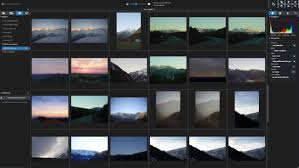
Why Photo Organization Matters
Good organization is essential for professional photography workflows.
Key benefits:
- Faster editing workflows
- Easier client delivery
- Better file management
- Reduced storage confusion
- Improved productivity
Without proper organization, even the best photos can get lost or duplicated.
What Makes a Good Photo Organization Tool?
The best tools in 2026 typically include:
- Fast file browsing
- Metadata tagging
- Keyword search
- Rating and labeling systems
- Cloud synchronization
- RAW file support
🏆 Best Photo Organization Tools in 2026
1. Adobe Lightroom (Industry Standard Library System)
Lightroom is not just an editing tool—it is also one of the best photo organization platforms.
Key Features:
- Smart albums and collections
- Keyword tagging system
- Rating and flagging tools
- AI-based subject recognition
- Cloud sync across devices
Best For:
- Wedding photographers
- Travel photographers
- High-volume workflows
👉 Lightroom remains the most complete all-in-one solution.
2. Adobe Bridge (File Management Power Tool)
Adobe Bridge is a dedicated file management tool for creatives.
Key Features:
- Folder-based organization
- Metadata editing
- Batch file renaming
- Direct Photoshop integration
Best For:
- Advanced users
- Designers and photographers
- Folder-based workflows
3. Capture One Catalog System
Capture One includes a powerful catalog system for organization.
Key Features:
- Session-based workflows
- Advanced color tagging
- Studio tethered organization
- High-performance RAW handling
Best For:
- Studio photographers
- Commercial photography workflows

4. Photo Mechanic (Speed King for Professionals)
Photo Mechanic is known for extremely fast image browsing.
Key Features:
- Instant RAW preview
- Lightning-fast culling
- Metadata editing tools
- IPTC support for professionals
Best For:
- Sports photographers
- News photographers
- Event shooters
5. Apple Photos / Google Photos (Basic Cloud Options)
These tools are simple but widely used.
Key Features:
- Automatic backup
- AI-based tagging
- Easy search functions
Best For:
- Casual photographers
- Smartphone users
- Basic organization needs
Lightroom vs Dedicated Organization Tools
Lightroom Advantages:
- Integrated editing + organization
- AI tagging and search
- Cloud sync system
Dedicated Tools Advantages:
- Faster file handling (Photo Mechanic)
- More control over folder structure (Bridge)
- Specialized workflows
Professional Photo Organization Workflow (2026 Standard)
- Import photos from camera
- Backup RAW files to storage
- Use Photo Mechanic or Lightroom for culling
- Organize selected images into collections
- Apply keywords and metadata
- Send selected images to Lightroom editing
Common Mistakes in Photo Organization
1. No Backup System
Risk of permanent data loss.
2. Poor Folder Structure
Leads to confusion and wasted time.
3. Not Using Keywords
Makes searching difficult in large libraries.
4. Mixing RAW and JPEG Without System
Creates disorganized workflows.

Who Should Use These Tools?
Lightroom / Capture One Catalogs:
- Professional photographers
- Wedding and travel shooters
Photo Mechanic:
- Sports photographers
- Press and media photographers
Adobe Bridge:
- Designers
- Advanced file managers
Cloud Tools (Google/Apple Photos):
- Beginners
- Mobile photographers
Final Thoughts
In 2026, photography is not just about capturing images—it is about managing massive digital libraries efficiently.
Photo organization tools play a critical role in ensuring smooth workflows, faster editing, and better client delivery.
For photographers in the United States, the best approach is often a hybrid system combining:
- Fast culling tools
- Professional catalog software
- Reliable cloud backup
Good organization is what separates amateur workflows from professional photography systems.
SEO Keywords
photo organization tools 2026, best photo management software, Lightroom catalog system, Photo Mechanic review, Capture One organization workflow, professional photo library management, photography file management tools USA